Private IP vs Public IP in Azure VMs
Posted on Sat 26 September 2026 in Cloud
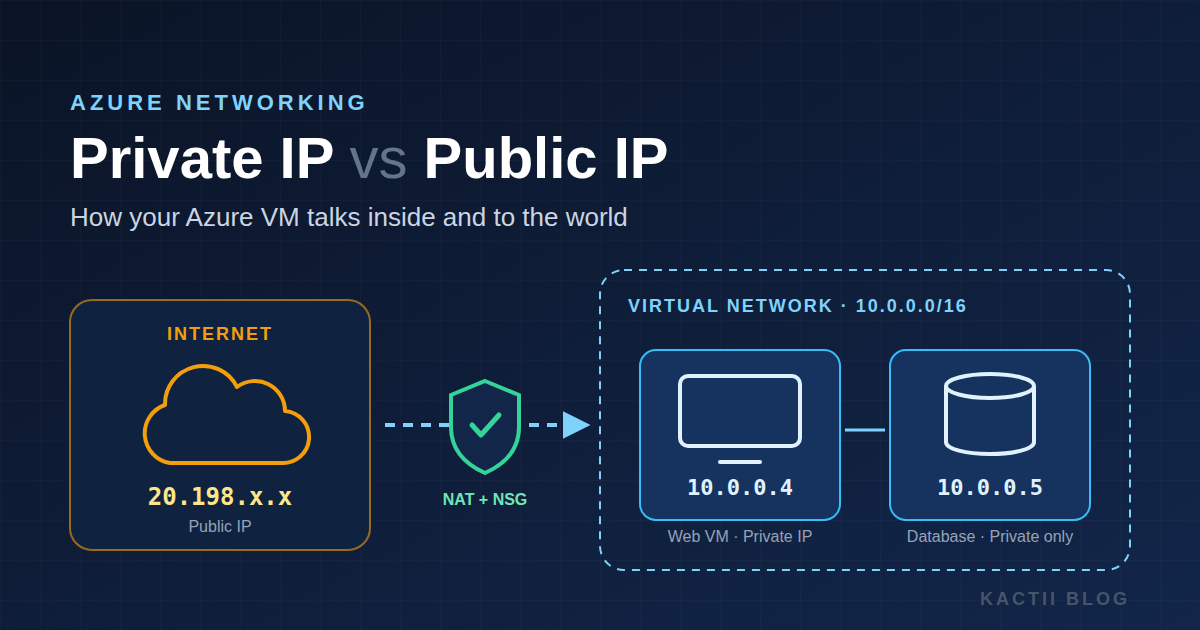
Every Azure VM you create has at least one IP address, and often two. Knowing which one does what is the difference between a VM that works on the first try and an evening spent wondering why your website won't load. The short version: the private IP is how your VM talks inside Azure, and the public IP is how the internet reaches it.
The Two Addresses
Private IP — The address your VM uses inside its virtual network (VNet). It comes from your subnet's range (for example 10.0.0.4) and follows the RFC 1918 private ranges: 10.x, 172.16–31.x and 192.168.x.
Every VM's network card (NIC) always gets one, and it's free. Only resources inside the same VNet, peered VNets, or networks connected over VPN or ExpressRoute can reach it.
Public IP — An internet-facing address (for example 20.198.x.x) that Azure assigns from Microsoft's pool.
It's optional. You create it as a separate resource and attach it to the NIC. It's billed hourly, and it's what lets your laptop, your users, or a DNS record reach the VM from outside Azure.
Side-by-Side
Reachability — The private IP works only inside Azure's private network and connected networks. The public IP is reachable from anywhere on the internet, subject to your firewall rules. That's why a database should usually sit on a private IP only, while a web server needs a public entry point.
Allocation — Private IPs are dynamic by default. They usually stay the same until you deallocate the VM, and you can set them to static. Standard SKU public IPs are always static. The older Basic SKU allowed dynamic public IPs, but it's being retired, so plan on Standard.
Cost — Private IPs cost nothing. Standard public IPs are charged per hour whether or not traffic flows. Deleting public IPs you no longer need is one of the easiest ways to save on an Azure bill.
Visibility inside the VM — Run ip addr on a Linux VM and you'll see only the private IP. The public IP never shows up in the operating system.
That's because Azure handles the public-to-private mapping outside the VM, using network address translation (NAT).
How Traffic Actually Flows
Inbound path — A request comes in to the public IP. Azure translates it to the VM's private IP, and the Network Security Group (NSG) decides whether to allow it. If SSH or your site isn't responding, check the NSG first. Ports like 22, 80 and 443 are opened there, not on the public IP.
Outbound path — When the VM calls an external API, the traffic leaves through the public IP if one is attached. Otherwise it needs a NAT Gateway or a load balancer's outbound rules. Azure is retiring "default outbound access" for new VNets, so a VM with no public IP and no NAT Gateway may not reach the internet at all.
VM-to-VM path — Two VMs in the same VNet should talk over their private IPs. It's faster, free of internet egress charges, and never exposed to the outside world.
A Real-World Setup
Take a typical app deployed on a single Azure VM, served at a custom domain like studybot.kactii.com.
DNS points to the public IP — The domain's A record holds the VM's public IP, so make that IP static. If it changes, your domain points nowhere until you update DNS.
Backend traffic uses the private IP — If the app talks to a database or cache in the same VNet, it should connect through their private IPs. Those services then need no public IP at all, which removes a whole class of attacks.
Locking it down further — For production, you can drop the VM's public IP entirely. Put it behind an Application Gateway or Load Balancer for web traffic, and use Azure Bastion for SSH. Only the gateway is exposed, and the VM itself becomes unreachable from the internet.
Key Takeaways
Private IP — Always there, free, and meant for internal communication. Use it for anything that talks inside Azure. It's the address your OS actually knows about.
Public IP — Optional, billed, and meant for reaching the VM from the internet. Keep it static if DNS points to it. It's controlled by the NSG, and fewer public IPs means a smaller attack surface.