Why My 4th Azure VM Failed (and Why Changing the Region Fixed It)
Posted on Sun 27 September 2026 in Cloud
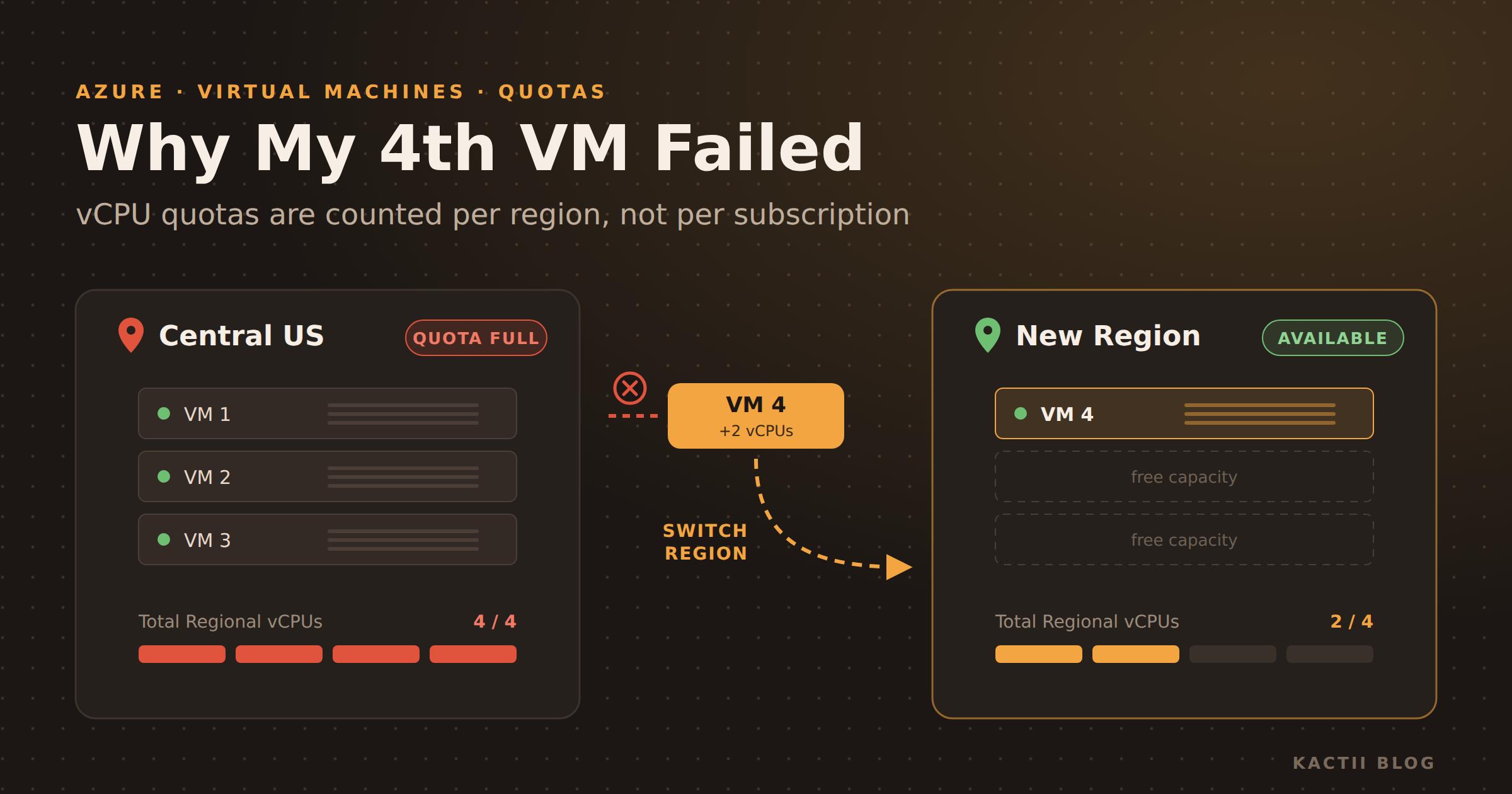
I had three D-series VMs running in Central US on Azure subscription 1. When I tried to create a fourth VM of the same kind in the same region, Azure refused. I switched to another region, tried again, and it worked right away. This post explains what happened, how to confirm it with one CLI command, and why Azure ties these limits to regions at all.
What Happened
The Symptom — Three D-series VMs were already running in Central US. Creating a fourth one in the same region failed. Nothing was wrong with the VM settings. Moving the same VM to a different region let it deploy without any errors.
The Real Cause — Azure limits how many vCPUs (virtual CPU cores) a subscription can use in each region. My subscription was already at that limit in Central US, so any new VM there was blocked, whatever its size or series.
Checking the Quota with the Azure CLI
The Command — Two lines tell you exactly where you stand:
az account set --subscription "Azure subscription 1" followed by az vm list-usage --location centralus -o table.
The output lists each quota with its current usage next to its limit.
The Row That Mattered — Total Regional vCPUs 4 4.
The whole region was capped at 4 vCPUs, and all 4 were in use. That cap covers every VM family, so switching to a different D family, or to B, E, or F, would have failed in the same way.
The Family Row — Standard Dalsv7 Family vCPUs 4 4.
My regular VMs were Dalsv7 (for example, two D2als_v7 at 2 vCPUs each), so the family quota was full as well.
The Spot VM Row — Total Regional Low-priority vCPUs 2 3.
Spot (low-priority) VMs are counted against a separate quota. My third VM was a 2-vCPU Spot VM, which left only 1 Spot vCPU free. That isn't enough for another 2-vCPU Spot VM.
The Pattern — Almost every VM family showed a limit of 4. Uniformly small limits like this usually mean a Free Trial or other restricted subscription. You can check the Offer field on the subscription's Overview page in the portal.
The Two Layers of vCPU Quota
Total Regional vCPUs — A ceiling on all standard VMs in one region together. Even if a family still has room, you can't go past this number.
Per-Family vCPUs — Each VM family (DSv5, Dasv5, Dalsv7, and so on) has its own separate quota. A new VM has to fit under its family limit and the regional limit at the same time.
Low-priority (Spot) vCPUs — Spot VMs have their own regional pool. They don't use up your standard quota, but that pool is usually small too.
Why Azure Gives Quotas Per Region
Every Region Is a Separate Set of Datacenters — Central US, Central India, and West Europe are physically separate buildings with their own servers, power, and cooling. Microsoft plans capacity for each region separately, so it makes sense for your share of that capacity to be counted per region too.
Protecting Shared Capacity — Many customers share the same hardware in a region. Per-region quotas stop one subscription, whether through a runaway script or deliberate abuse, from using up a whole region's capacity.
Fraud and Cost Protection — New and free subscriptions get small quotas on purpose. If someone steals the account, or you make a mistake in automation, the damage (and the bill) is limited to a few vCPUs in each region.
Growth Happens in Steps — Quota increases are approved per region and per family. That lets Azure grow your limits where you actually run workloads, instead of handing out a large limit everywhere at once.
Capacity Can Differ by Region — A VM size can sell out in one region while another region still has plenty.
That shows up as SkuNotAvailable or AllocationFailed. It is a different error from a quota error, but changing the region fixes both.
Why Changing the Region Worked for Me
A Fresh Quota — The new region had its own 4 vCPUs, and I was using none of them. The same VM that was blocked in Central US fit easily there.
Things to Consider First — VMs in different regions sit in different virtual networks (VNets). They can't talk to each other privately unless you set up VNet peering. Latency to your users also changes, so choose a region close to them, such as Central India for users in India.
Ways to Fix It
Spread Across Regions — Use each region's own quota for separate apps or services. This works well when the VMs don't need to talk to each other privately.
Request a Quota Increase — In the portal, go to Quotas → Compute, pick the region, and request increases for Total Regional vCPUs and the VM family. On a Free Trial this is usually refused, so you would upgrade to Pay-As-You-Go first.
Free Up vCPUs — Delete VMs you don't need, or resize one to a smaller size. A deallocated VM doesn't count against quota. A VM you shut down from inside the OS still shows as "Stopped" and keeps using its quota. Only "Stopped (deallocated)" releases it.
Key Takeaway
Quotas Are Regional — When a VM fails to deploy in one region but works in another, check az vm list-usage first.
Your quota is counted per region and per VM family, and knowing that turns a confusing error into a two-minute fix.